
Quick answer
ChatGPT can draft. Lexi helps the firm follow through.
ChatGPT is useful for individual drafting, summarization, brainstorming, and research assistance. Lexi is designed for the operational workflows that surround legal work, including intake, scheduling, follow-up, communication, and administrative coordination.
- Choose ChatGPT for flexible individual productivity tasks.
- Choose Lexi when the firm needs repeatable operational workflows across staff, attorneys, and matters.
- The difference is not intelligence alone. It is whether the system can move work through the firm.
This guide is written for law firm buyers comparing operational fit as of May 2026. Lexi is our product, so the recommendation is explicit about where Lexi fits, where another tool may be the better answer, and which workflow problem should drive the decision.
Many attorneys already use ChatGPT for:
- Drafting
- Summarization
- Brainstorming
- Research Assistance
- First-Pass Review
For individual productivity, it can be extremely useful. But most firms quickly run into the same issue: ChatGPT is not built to run a law firm. That is the layer Lexi is designed for.
What ChatGPT Does Well
ChatGPT is a general-purpose AI model designed for:
- Writing
- Reasoning
- Summarization
- Research Assistance
- Conversational Workflows
Law firms commonly use ChatGPT for:
- Drafting Emails
- Reviewing Contracts
- Organizing Information
- Generating First Drafts
- Summarizing Documents
- Brainstorming Legal Arguments
For many attorneys, ChatGPT already functions like an intelligent assistant.
Where ChatGPT Stops
ChatGPT does not manage:
- Intake
- Scheduling
- Workflow Coordination
- Matter Movement
- Follow-Up
- Client Communication
- Operational Consistency
As a result, many firms still operate through:
- Email Chains
- Spreadsheets
- Manual Scheduling
- Fragmented Communication
- Intake Bottlenecks
- Repetitive Administrative Work
The AI may generate work faster. The firm itself often remains fragmented.
What Lexi Does
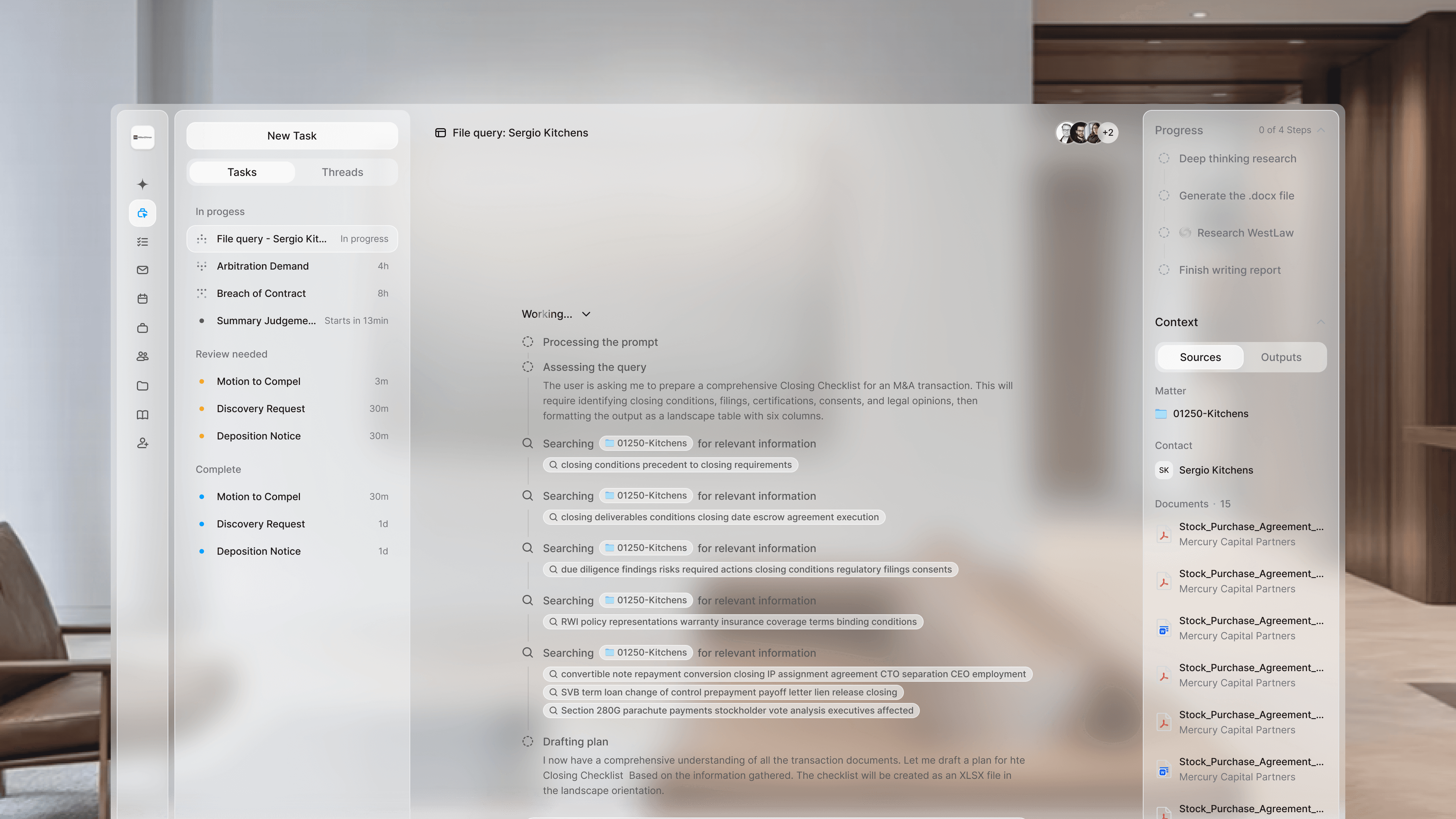
Lexi OS automatically progressing client intake, reminders, and task handoffs without the attorney prompting every step.
Lexi is an AI operations platform built specifically for law firms.
It handles the operational layer around legal work:
- Intake
- Scheduling
- Workflow Execution
- Client Communication
- Follow-Up
- Administrative Coordination
The work around the work.
Instead of requiring firms to build workflows manually around a general-purpose AI tool, Lexi provides a structured operational system designed specifically for legal practices.
General AI vs Law Firm Infrastructure
| Question | ChatGPT | Lexi |
|---|---|---|
| Primary job | General AI assistant for writing, research support, and ideation | Run the operational work around the legal work |
| Best for | Fast drafting help, summaries, and exploratory legal-adjacent work | Intake, communication, follow-up, workflow movement, and administrative execution |
| System layer | Assistant layer that waits for user prompts | Operational execution layer that connects existing tools |
| Firm outcome | Better or faster legal output | Faster response, cleaner intake, less administrative drag, and more consistent client experience |
ChatGPT is general intelligence. Lexi is operational infrastructure for law firms. That distinction matters.
ChatGPT helps generate output.
Lexi helps move matters through the firm:
- From Inquiry
- To Intake
- To Scheduling
- To Communication
- To Completion
What Lexi Replaces
Lexi reduces dependence on fragmented operational systems like:
- Intake Software
- Disconnected CRMs
- Scheduling Tools
- Manual Follow-Up
- Repetitive Administrative Workflows
- Internal Coordination Overhead
It works alongside systems firms already use:
- Clio
- Westlaw
- Slack
- Microsoft Teams
The goal is not adding another disconnected tool. The goal is reducing operational friction.
Can Firms Use Both?
Absolutely.
Many firms will use:
- ChatGPT For Drafting, Summarization, And Brainstorming
- Lexi For Intake, Communication, Scheduling, And Workflow Coordination
The systems solve different problems.
Who ChatGPT Is Best For
ChatGPT is best for attorneys looking for:
- General AI Assistance
- Drafting Support
- Summarization
- Flexible Conversational Workflows
- First-Pass Research Assistance
Who Lexi Is Best For
Lexi is best for firms trying to improve:
- Responsiveness
- Intake Efficiency
- Workflow Coordination
- Client Communication
- Operational Consistency
- Administrative Scalability
Especially firms handling growing inquiry volume or operational bottlenecks.
The Operational Layer
Most firms already have ways to generate legal work.
What many firms still lack is a system for:
- Running Intake Cleanly
- Coordinating Communication
- Managing Follow-Through
- Reducing Administrative Drag
- Moving Matters Efficiently Through The Practice
That operational layer shapes:
- Conversion
- Responsiveness
- Client Experience
- Scalability
Lexi is built to run that layer.
FAQ
Can a law firm use ChatGPT instead of Lexi?
ChatGPT can help with drafting and analysis, but it does not replace a law firm operations system. Lexi focuses on intake, scheduling, communication, workflow coordination, and administrative execution.
What is the biggest limitation of ChatGPT for law firms?
The biggest limitation is operational follow-through. ChatGPT answers prompts, but it does not own client intake, schedule next steps, coordinate staff, or maintain matter movement by itself.
Why would a firm use both ChatGPT and Lexi?
A firm may use ChatGPT for individual thinking and drafting while using Lexi to manage the operational layer around clients, matters, and follow-up.
Is Lexi a legal drafting tool?
Lexi can support legal workflows, but its core value is law firm operations: intake, client communication, workflow movement, deadline tracking, and administrative coordination.
ChatGPT is a powerful AI tool. Lexi is a system built specifically for how law firms operate.