
Quick answer
Clio is the system of record. Lexi is the workflow layer around it.
Clio helps firms organize matters, billing, calendars, documents, and practice administration. Lexi helps move work around those records by coordinating intake, follow-up, scheduling, client communication, and operational handoffs.
- Choose Clio when the firm needs a practice management backbone.
- Choose Lexi when the firm needs operational automation on top of the tools it already uses.
- Use both when Clio stores the matter and Lexi keeps the matter moving.
This guide is written for law firm buyers comparing operational fit as of May 2026. Lexi is our product, so the recommendation is explicit about where Lexi fits, where another tool may be the better answer, and which workflow problem should drive the decision.
Clio has become one of the most widely adopted platforms in legal technology.
For many firms, it functions as the system of record for:
- Matters
- Billing
- Documents
- Calendaring
- Case Management
Lexi is built for a different layer of the practice.
The operational work surrounding those matters:
- Intake
- Scheduling
- Follow-Up
- Client Communication
- Workflow Coordination
- Administrative Execution
The work before, between, and around legal work.
What Clio Does Well
Clio is a legal practice management platform designed to help firms organize and manage matters.
Its platform focuses on:
- Case Management
- Billing
- Time Tracking
- Document Storage
- Calendaring
- Practice Administration
For many firms, Clio serves as the operational backbone of matter management. It centralizes firm information and helps legal teams stay organized.
Where Firms Still Struggle
Even firms using Clio successfully often still rely on:
- Manual Intake
- Email Chains
- Fragmented Follow-Up
- Disconnected Communication
- Repetitive Administrative Tasks
- Workflow Bottlenecks
In many firms:
- Leads still fall through the cracks
- Follow-up remains inconsistent
- Scheduling remains manual
- Responsiveness depends on staff bandwidth
The matter may exist inside Clio. The operational movement around it often remains fragmented.
What Lexi Does
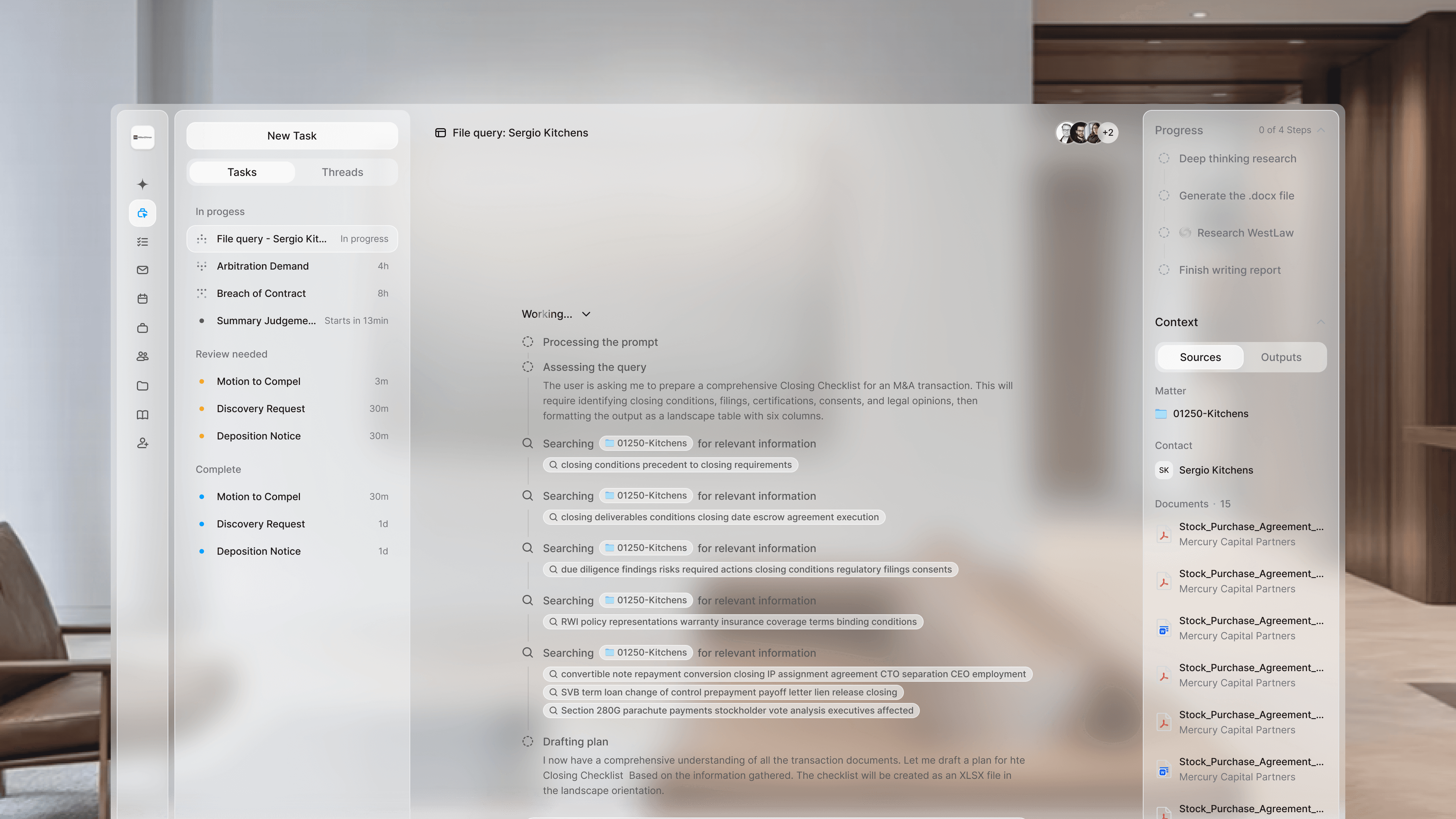
Lexi OS reading matter context, coordinating next steps, and surfacing exceptions while Clio remains the system of record.
Lexi is an AI operations platform built specifically for law firms.
It handles:
- Intake
- Scheduling
- Workflow Execution
- Client Communication
- Follow-Up
- Administrative Coordination
The work around the work.
Instead of replacing practice management software, Lexi structures the operational layer around it. The goal is not replacing systems firms already use. The goal is reducing operational friction between them.
Practice Management vs Operational Automation
| Question | Clio | Lexi |
|---|---|---|
| Primary job | Practice management system for matters, billing, documents, and records | Run the operational work around the legal work |
| Best for | System of record, case organization, timekeeping, and firm administration | Intake, communication, follow-up, workflow movement, and administrative execution |
| System layer | Practice management and matter database layer | Operational execution layer that connects existing tools |
| Firm outcome | Better or faster legal output | Faster response, cleaner intake, less administrative drag, and more consistent client experience |
This is the distinction many firms are now realizing. Practice management software helps organize legal matters.
Operational AI systems help move work through the firm:
- Faster Intake
- Faster Response Times
- Faster Scheduling
- Faster Follow-Up
- Cleaner Coordination
Those are different categories. Clio manages legal matters. Lexi manages operational movement around them.
What Lexi Replaces
Lexi reduces dependence on fragmented operational systems like:
- Intake Forms
- Manual Scheduling
- Disconnected CRMs
- Administrative Follow-Up
- Repetitive Workflow Coordination
- Internal Communication Gaps
Instead of relying on multiple disconnected tools and manual handoffs, Lexi creates a structured workflow layer around the client lifecycle.
Can Firms Use Both?
Absolutely.
Many firms will use:
- Clio as the system of record
- Lexi as the operational workflow layer around it
Lexi works alongside systems firms already use:
- Clio
- Westlaw
- Slack
- Microsoft Teams
The platforms solve different operational problems.
Who Clio Is Best For
Clio is best for firms looking for:
- Matter Management
- Billing
- Time Tracking
- Document Organization
- Practice Management Infrastructure
Who Lexi Is Best For
Lexi is best for firms trying to improve:
- Responsiveness
- Intake Efficiency
- Workflow Coordination
- Client Communication
- Operational Consistency
- Administrative Scalability
Especially firms managing growing inquiry volume or operational bottlenecks.
The Operational Layer
Most firms already have systems for storing legal matters.
What many firms still lack is a system for:
- Running Intake Cleanly
- Coordinating Follow-Up
- Managing Communication
- Reducing Administrative Drag
- Moving Matters Efficiently Through The Firm
That operational layer shapes:
- Client Experience
- Conversion
- Responsiveness
- Internal Efficiency
Lexi is built to run that layer.
FAQ
Does Lexi replace Clio?
No. Clio and Lexi are different layers. Clio is a practice management system and system of record. Lexi is an operational workflow layer that can work around systems like Clio.
What does Lexi do that Clio does not?
Lexi focuses on intake, scheduling, follow-up, client communication, workflow movement, and administrative coordination across the firm.
Should a firm buy Clio or Lexi first?
If the firm lacks a system of record for matters and billing, Clio may come first. If the firm already has matter management but still struggles with response speed and handoffs, Lexi is the more direct fix.
Can Lexi work with Clio?
Lexi is designed to work alongside the systems firms already use, including practice management tools such as Clio.
Clio organizes legal work. Lexi helps move legal work through the firm.